


Great news Mark! It might be that this newly discovered Lear45 by Flightsim.to is as good as the option we have in P3D. So why not make the move to MSFS2020? The issues you have reported so far can easily be resolved in the aircraft cfg file. In my case, the timing sucks because I just purchased P3D V5 Academic and about $100 worth of ORBX scenery. (Global Base and TrueEarth US Florida pack.) I am going to hold off on purchasing anymore scenery or addons for P3D until we can prove one way or the other which direction we are going. I can't believe we all missed this! Great news Mark! It might be that this newly discovered Lear45 by Flightsim.to is as good as the option we have in P3D. So why not make the move to MSFS2020? The issues you have reported so far can easily be resolved in the aircraft cfg file. In my case, the timing sucks because I just purchased P3D V5 Academic and about $100 worth of ORBX scenery. (Global Base and TrueEarth US Florida pack.) I am going to hold off on purchasing anymore scenery or addons for P3D until we can prove one way or the other which direction we are going. I can't believe we all missed this! Ron, You will need to keep P3D going as you need a base to do your Jet45 testing. Just don't buy anymore scenery, unless it's free. My MSFS2020 computer is different to my P3D computer so migrating to 2020 with Jet45 will take a bit of planning. I may try two sets of Jet45 files, (if that is an option ) one for P3D and the other MSFS, so both make it easier to swap between the two. The bigger update for me will be Fly Elise warping software for MSFS. That'll take some investigation to see how the compiled files get integrated into MSFS. As well as Brownie points from the boss. Should be easy enough though. Plenty to do.................and prepare for an upcoming bushfire season. No time line promises but it has to be done eventually. I'll be ready for Just Flight. Ron, You will need to keep P3D going as you need a base to do your Jet45 testing. Just don't buy anymore scenery, unless it's free. My MSFS2020 computer is different to my P3D computer so migrating to 2020 with Jet45 will take a bit of planning. I may try two sets of Jet45 files, (if that is an option ) one for P3D and the other MSFS, so both make it easier to swap between the two. The bigger update for me will be Fly Elise warping software for MSFS. That'll take some investigation to see how the compiled files get integrated into MSFS. As well as Brownie points from the boss. Should be easy enough though. Plenty to do.................and prepare for an upcoming bushfire season. No time line promises but it has to be done eventually. I'll be ready for Just Flight. I just downloaded this Lear45 in MSFS2024, although it says it's not compatible for msfs2024, there are no issues as far as I can tell. For now it is the best Lear45 add on for MSFS! Indeed I can use it with the Airmanager, no problem. Good find Ron! I just downloaded this Lear45 in MSFS2024, although it says it's not compatible for msfs2024, there are no issues as far as I can tell. For now it is the best Lear45 add on for MSFS! Indeed I can use it with the Airmanager, no problem. Good find Ron! Great news Roel! It's a bonus that it also works in MSFS2024, that was not expected. I wonder why they say it's only compatible with MSFS2020? It's been out since July 2024. When able, post up some screen shots or even a short video of your sim using this model in MSFS2024. It's very exciting to hear we have something to fly now in MSFS while waiting for the JF Lear45 "Professional". Great news Roel! It's a bonus that it also works in MSFS2024, that was not expected. I wonder why they say it's only compatible with MSFS2020? It's been out since July 2024. When able, post up some screen shots or even a short video of your sim using this model in MSFS2024. It's very exciting to hear we have something to fly now in MSFS while waiting for the JF Lear45 "Professional". Almost a year old but just discovered this video highlighting the JF Lear45 "Professional" under development! https://youtu.be/X9oKCf2O3bQ Almost a year old but just discovered this video highlighting the JF Lear45 "Professional" under development!
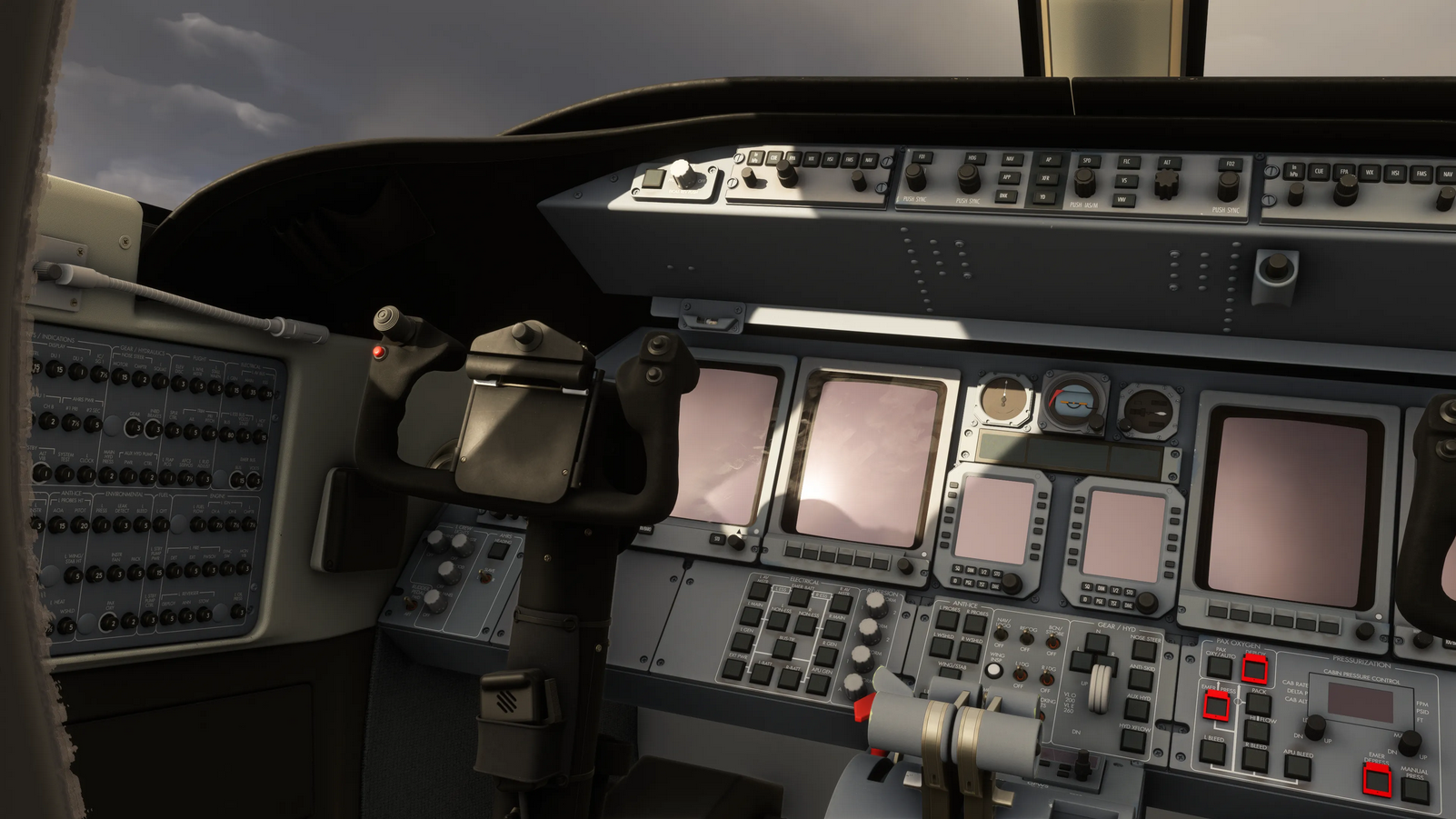
Hey guys, As you are aware, I have my sim computers up and running and I am finally in a position to install a simulator and do some test flying. Just a month ago, the short term plan forward was to use P3D v5 and the Perfect Flight Lear45. That was going great until I discovered the Flightsim.to Lear45 for MSFS2020. Mark, Roel and a few others quickly took to it and confirmed it works. The consensus was it's not perfect but it's also not bad either. This Lear45 model finally gives us the bridge to MSFS2020/2024 that we have been waiting for! So about a week ago, I went ahead and installed MSFS2020 on my Server-PC along with P3D v5. It's pretty much configured with FSUIPC7 and a few other support programs. I have installed this Flightsim.to Learjet45 and I was also pleasantly surprised that it flies very well for what it is. And what is it? It's actually the Asobo CJ4 incognito with a Lear45 mask. The outside looks like a Lear45 and most of the flight control surfaces move along with the cockpit controls. The cockpit is a bit of a mix match of CJ4 displays and Lear45 panels. It's not perfect but it does fly! Once I got my CH yokes configured in MSFS2020 to match the same settings in P3D v5, (what I am use to), I was able to get it off the ground and back on the ground without much trouble in VFR conditions. As I mentioned previously, this Lear45 model is going to be a great "stopgap" aircraft for us to test MSFS2020 and work out as many issues as we can while waiting for the Just Flight Lear45 "Professional". There are two big things missing in this Flightsim.to Lear45 model. Thrust reversers and an APU. The reason why they are missing is because these items are not equipment included in the CJ4. The creator, "Robertsv" was not able to model these features at this point in time. Can they be modeled? I suppose so, but it would be a hard sell to try to get him or anyone else to model these items knowing the release of the JF Lear45 is on the horizon. I think if it ever came down to it, in other words, if JF is unable to follow through with their Lear45 product, we could find a way to add thrust reversers and an APU. But no sense on spending too much time on this subject unless one of you know of a way to make it happen with relative ease. Besides those two issues mentioned above, the only other issues reported.....so far is the flight control pitch is a little touchy and the flaps degree 8 and flaps degree 20 display 9 and 21 on the Jet45 EICAS. Today I was able to resolve the flaps displaying incorrectly in Jet45. The fix was similar to the way we had to fix it in P3D except in MSFS2020, the "Airplane" folder is not as easy to locate. Keep in mind I have only been working with MSFS2020, the PC version for just a couple days so some of what I am spelling out here might sound elementary. I found that the reason why it was impossible to find the Microsoft Flight Simulator folder was because it was within a hidden "AppData" folder. The first thing you need to do is unhide hidden folders on your "C" drive or whatever drive your sim is on. (I am also only a couple months old at working with Windows11 after skipping right over Windows10) Once you are able to find the "AppData" folder, follow this path to find the place to make the changes in the flight_model.cfg file: Go to: users/(your personal folder your PC created for you, in my case,"ronjo")/AppData/Roaming/Microsoft Flight Simulator/Packages/Community/Robertsv-Learjet45/SimObjects/Airplanes/Learjet45 and then look for the flight_model.cfg file. Depending on where you installed MSFS2020 your path may vary. Once inside the flight_model.cfg file, scroll down to [FLAPS.0] and in this section, look for the section that covers the four flaps positions, 0,8,20,40. Simply replace 8 with 7.5 and 20 with 19. While you are in this section, you can also increase the extending-time= from 5 to 10 seconds. This is more in line with the actual flaps transition time. SAVE, close and test, the flaps degrees should now display properly in Jet45. One other point worth mentioning, I initially changed these settings within MSFS2020 via the "Developers Mode" tab. This basically allowed me to go to the same exact flight_model.cfg file and make the changes, but when I SAVE, close and test, the changes did not take. I fooled around with this for an hour with no luck. It was not until I found the AppData folder and went that route did the change take hold. Strange. I mention this because I was just about ready to say that these values could not be changed and we will have to live with flaps 0,9,21,40. So keep this in mind when you are trying to fix something and you don't immediately see the results you are looking for. In most cases, whatever it is you are trying to fix can be fixed, you just have to come at it from a different angle. This may seem like a trivial issue to go after and try to fix but during the process, I got a free education out of the exercise. The next thing that I try to fix should go a lot faster! Bottom line, we are now officially in MSFS with something that looks like a Lear45. The visuals in MSFS are stunning compared to P3D. And with a couple addons, it's second to only the real world. I have no idea what my framerates are but they are high enough that it's not even a question. And this is flying in and out of major Payware airports like KTPA, KMCO, KDCA and KJAX. Mind you I am using an older GTX 1070 that I picked up in 2017. I will have to upgrade to a GTX 3090 once I expand to the 220 degree three projector system, but until then, the GTX 1070 is working fine believe it or not. Ironically, the performance in MSFS2020 is way better than P3D v5 when test flying with the same payware airports. I would think the newer higher resolution and detailed simulator would be harder on my hardware. Not so. More testing, news and findings coming soon! If you guys have any comments, fixes, etc, please post and share! Hey guys, As you are aware, I have my sim computers up and running and I am finally in a position to install a simulator and do some test flying. Just a month ago, the short term plan forward was to use P3D v5 and the Perfect Flight Lear45. That was going great until I discovered the Flightsim.to Lear45 for MSFS2020. Mark, Roel and a few others quickly took to it and confirmed it works. The consensus was it's not perfect but it's also not bad either. This Lear45 model finally gives us the bridge to MSFS2020/2024 that we have been waiting for! So about a week ago, I went ahead and installed MSFS2020 on my Server-PC along with P3D v5. It's pretty much configured with FSUIPC7 and a few other support programs. I have installed this Flightsim.to Learjet45 and I was also pleasantly surprised that it flies very well for what it is. And what is it? It's actually the Asobo CJ4 incognito with a Lear45 mask. The outside looks like a Lear45 and most of the flight control surfaces move along with the cockpit controls. The cockpit is a bit of a mix match of CJ4 displays and Lear45 panels. It's not perfect but it does fly! Once I got my CH yokes configured in MSFS2020 to match the same settings in P3D v5, (what I am use to), I was able to get it off the ground and back on the ground without much trouble in VFR conditions. As I mentioned previously, this Lear45 model is going to be a great "stopgap" aircraft for us to test MSFS2020 and work out as many issues as we can while waiting for the Just Flight Lear45 "Professional". There are two big things missing in this Flightsim.to Lear45 model. Thrust reversers and an APU. The reason why they are missing is because these items are not equipment included in the CJ4. The creator, "Robertsv" was not able to model these features at this point in time. Can they be modeled? I suppose so, but it would be a hard sell to try to get him or anyone else to model these items knowing the release of the JF Lear45 is on the horizon. I think if it ever came down to it, in other words, if JF is unable to follow through with their Lear45 product, we could find a way to add thrust reversers and an APU. But no sense on spending too much time on this subject unless one of you know of a way to make it happen with relative ease. Besides those two issues mentioned above, the only other issues reported.....so far is the flight control pitch is a little touchy and the flaps degree 8 and flaps degree 20 display 9 and 21 on the Jet45 EICAS. Today I was able to resolve the flaps displaying incorrectly in Jet45. The fix was similar to the way we had to fix it in P3D except in MSFS2020, the "Airplane" folder is not as easy to locate. Keep in mind I have only been working with MSFS2020, the PC version for just a couple days so some of what I am spelling out here might sound elementary. I found that the reason why it was impossible to find the Microsoft Flight Simulator folder was because it was within a hidden "AppData" folder. The first thing you need to do is unhide hidden folders on your "C" drive or whatever drive your sim is on. (I am also only a couple months old at working with Windows11 after skipping right over Windows10) Once you are able to find the "AppData" folder, follow this path to find the place to make the changes in the flight_model.cfg file: Go to: users/(your personal folder your PC created for you, in my case,"ronjo")/AppData/Roaming/Microsoft Flight Simulator/Packages/Community/Robertsv-Learjet45/SimObjects/Airplanes/Learjet45 and then look for the flight_model.cfg file. Depending on where you installed MSFS2020 your path may vary. Once inside the flight_model.cfg file, scroll down to [FLAPS.0] and in this section, look for the section that covers the four flaps positions, 0,8,20,40. Simply replace 8 with 7.5 and 20 with 19. While you are in this section, you can also increase the extending-time= from 5 to 10 seconds. This is more in line with the actual flaps transition time. SAVE, close and test, the flaps degrees should now display properly in Jet45. One other point worth mentioning, I initially changed these settings within MSFS2020 via the "Developers Mode" tab. This basically allowed me to go to the same exact flight_model.cfg file and make the changes, but when I SAVE, close and test, the changes did not take. I fooled around with this for an hour with no luck. It was not until I found the AppData folder and went that route did the change take hold. Strange. I mention this because I was just about ready to say that these values could not be changed and we will have to live with flaps 0,9,21,40. So keep this in mind when you are trying to fix something and you don't immediately see the results you are looking for. In most cases, whatever it is you are trying to fix can be fixed, you just have to come at it from a different angle. This may seem like a trivial issue to go after and try to fix but during the process, I got a free education out of the exercise. The next thing that I try to fix should go a lot faster! Bottom line, we are now officially in MSFS with something that looks like a Lear45. The visuals in MSFS are stunning compared to P3D. And with a couple addons, it's second to only the real world. I have no idea what my framerates are but they are high enough that it's not even a question. And this is flying in and out of major Payware airports like KTPA, KMCO, KDCA and KJAX. Mind you I am using an older GTX 1070 that I picked up in 2017. I will have to upgrade to a GTX 3090 once I expand to the 220 degree three projector system, but until then, the GTX 1070 is working fine believe it or not. Ironically, the performance in MSFS2020 is way better than P3D v5 when test flying with the same payware airports. I would think the newer higher resolution and detailed simulator would be harder on my hardware. Not so. More testing, news and findings coming soon! If you guys have any comments, fixes, etc, please post and share! Hi Ron I tested this briefly but not in my sim. Hi Ron I tested this briefly but not in my sim. Hey guys, Just Flight made a quick announcement reference their up and coming Learjet45 "Professional" in one of their "End of Year Round Up 2025" news articles! In summary, they are nearing completion of the graphics design and now have a full-time coder assigned to the project. They are anticipating significant progress in 2026 on the model! Here are a couple screen shots they are sharing with us! You can find a link to their full news release HERE Any additional information will be posted just as soon as we are aware of it! Hey guys, Just Flight made a quick announcement reference their up and coming Learjet45 "Professional" in one of their "End of Year Round Up 2025" news articles! In summary, they are nearing completion of the graphics design and now have a full-time coder assigned to the project. They are anticipating significant progress in 2026 on the model! Here are a couple screen shots they are sharing with us! You can find a link to their full news release HERE Any additional information will be posted just as soon as we are aware of it! Hey guys, Jason and Mark have been "spearheading" efforts to test Jet45 in the latest and greatest flight sim engine which is currently MSFS2024. Thankfully this was made possible by the hybrid Robertsv Lear45 which is based on the CJ4 found in MSFS2020. The Robertsv Lear45 hybrid model was only intended to be used in MSFS2020, however, we have found that with a few tweaks and fixes, it can be used in MSFS2024. It's not perfect but it does give us a viable path to push forward with development and testing in preparation of the JustFlight Lear45 "Professional" in the works. Jason now has a huge advantage working out the details of what it will take to fully implement Jet45 within the newest and most advanced flight sim, MSFS2024! This post will cover the missing sounds and sound files needed in order for the Robertsv Lear45 to work within MSFS2024. (The following instructions were created and compiled by Mark Speechley) First, download the zip file as soon as possible due to Dropbox is not permanent: https://www.dropbox.com/scl/fi/bn28qvuk6mgwkoe3kfotg/Lear-files.zip?rlkey=y9d82haep78aby7kz91w22p28&st=phtcr2e6&dl-0 In the Dropbox zip file: 1. Place the Sound Folder in the Robertsv Learjet, root directory in Community folder. NOTE: This Sound Folder came from the CJ4 Aircraft directory so you can save it from that location as well if the Dropbox option above fails. This sound file is TOO LARGE for this forum, otherwise it would be made available here. 2. Copy and replace the Aircraft.cfg in Robertsv Learjet. NOTE: Attached to this post is a copy of the updated Aircraft.cfg that is found in the Dropbox file. 2.1 The required fix, is line 85, sound, under FLTSIM.0 , same again in line 118 and Line 151. You just need to change (Mark's address), to suit your own address, for the newly placed Sound folder. The fix is . Must have ' fallback.1 ' inserted. 2.2 Not required, but whilst there, had issues with ATC_model="45" and model="45" in BeyondATC. It refused MSFS2024, LittleNavMap and Plan G Flight Plans due to '45" not differentiating which plane with just '45' in description. Change to "LJ45" from "45" wherever found, fixed error. Seems to be no issues since. Additionally, there is a missing piece, the Layout.json It has not been updated for the changes we have done so far, so here is the last procedure: 1. Download this zip from Mark's Dropbox. Unzip. Or... Download it yourself from github and unzip if necessary: https://github.com/HughesMDflyer4/MSFSLayoutGenerator/releases The file you are looking for is MSFSLayoutGenerator.exe 2. Place this exe file in the robertsv-learjet45 directory in the community Folder. You know you have the right one as it has layout.json and manifest.json 3. Drag and drop layout.json onto MSFSLayoutGenerator.exe. This will cause a quick scan of the robertsv-learjet folder and write a new layout.json WITH our changes previously done. If all correct, the new layout.json should have a new timestamp. 4. Restart MSFS2024, choose the Robertsv-Learjet45, check for daytime and load runway, NOT parking. Runway will start with engines running. You now should hear the engines running along with other sounds associated with the Robertsv Lear45 model. Hopefully the sounds are all good now with MSFS2024! If you are still having issues and not hearing the Learjet sounds which are really the CJ4 sounds while using the Robertsv Learjet, uninstall the Robertsv Learjet and reinstall. Then try these procedures above again. Thank you to Mark for finding a solution to this problem! At this time, both Mark and Jason have proven this fix works. If you have any questions or issues getting this to work for yourself, please post here. In the near future, I will be applying this fix to my MSFS2024 / Robertsv Lear45 model and will add any additional notes if necessary. Hey guys, Jason and Mark have been "spearheading" efforts to test Jet45 in the latest and greatest flight sim engine which is currently MSFS2024. Thankfully this was made possible by the hybrid Robertsv Lear45 which is based on the CJ4 found in MSFS2020. The Robertsv Lear45 hybrid model was only intended to be used in MSFS2020, however, we have found that with a few tweaks and fixes, it can be used in MSFS2024. It's not perfect but it does give us a viable path to push forward with development and testing in preparation of the JustFlight Lear45 "Professional" in the works. Jason now has a huge advantage working out the details of what it will take to fully implement Jet45 within the newest and most advanced flight sim, MSFS2024! This post will cover the missing sounds and sound files needed in order for the Robertsv Lear45 to work within MSFS2024. (The following instructions were created and compiled by Mark Speechley) First, download the zip file as soon as possible due to Dropbox is not permanent: https://www.dropbox.com/scl/fi/bn28qvuk6mgwkoe3kfotg/Lear-files.zip?rlkey=y9d82haep78aby7kz91w22p28&st=phtcr2e6&dl-0 In the Dropbox zip file: 1. Place the Sound Folder in the Robertsv Learjet, root directory in Community folder. NOTE: This Sound Folder came from the CJ4 Aircraft directory so you can save it from that location as well if the Dropbox option above fails. This sound file is TOO LARGE for this forum, otherwise it would be made available here. 2. Copy and replace the Aircraft.cfg in Robertsv Learjet. NOTE: Attached to this post is a copy of the updated Aircraft.cfg that is found in the Dropbox file. 2.1 The required fix, is line 85, sound, under FLTSIM.0 , same again in line 118 and Line 151. You just need to change (Mark's address), to suit your own address, for the newly placed Sound folder. The fix is . Must have ' fallback.1 ' inserted. 2.2 Not required, but whilst there, had issues with ATC_model="45" and model="45" in BeyondATC. It refused MSFS2024, LittleNavMap and Plan G Flight Plans due to '45" not differentiating which plane with just '45' in description. Change to "LJ45" from "45" wherever found, fixed error. Seems to be no issues since. Additionally, there is a missing piece, the Layout.json It has not been updated for the changes we have done so far, so here is the last procedure: 1. Download this zip from Mark's Dropbox. Unzip. https://www.dropbox.com/scl/fi/7g2l7l7o8qjwt2tt8axs1/MSFSLayoutGenerator.zip?rlkey=ob70ifkp6sope977wfhkh0cqk&dl=0 Or... Download it yourself from github and unzip if necessary: https://github.com/HughesMDflyer4/MSFSLayoutGenerator/releases The file you are looking for is MSFSLayoutGenerator.exe 2. Place this exe file in the robertsv-learjet45 directory in the community Folder. You know you have the right one as it has layout.json and manifest.json 3. Drag and drop layout.json onto MSFSLayoutGenerator.exe. This will cause a quick scan of the robertsv-learjet folder and write a new layout.json WITH our changes previously done. If all correct, the new layout.json should have a new timestamp. 4. Restart MSFS2024, choose the Robertsv-Learjet45, check for daytime and load runway, NOT parking. Runway will start with engines running. You now should hear the engines running along with other sounds associated with the Robertsv Lear45 model. Hopefully the sounds are all good now with MSFS2024! If you are still having issues and not hearing the Learjet sounds which are really the CJ4 sounds while using the Robertsv Learjet, uninstall the Robertsv Learjet and reinstall. Then try these procedures above again. Thank you to Mark for finding a solution to this problem! At this time, both Mark and Jason have proven this fix works. If you have any questions or issues getting this to work for yourself, please post here. In the near future, I will be applying this fix to my MSFS2024 / Robertsv Lear45 model and will add any additional notes if necessary. hi guys i just stumbled upon this software what makes streaming instruments to other pc’s very easy!! https://glassout.flyingart.dev/ there is a demo version but the license is really cheap this guy explains it on his youtube channel https://youtu.be/Lj7ENsHqjNk?is=wHhvFhKxpHidnI2z i just bought a license and it is amazing, now hopefully the justflight lear 45 will be available soon! grtz Roel hi guys i just stumbled upon this software what makes streaming instruments to other pc’s very easy!! https://glassout.flyingart.dev/ there is a demo version but the license is really cheap this guy explains it on his youtube channel
i just bought a license and it is amazing, now hopefully the justflight lear 45 will be available soon! grtz RoelLear45 in FS2020/24 Solutions


(upon just flight release I guess )
(upon just flight release I guess )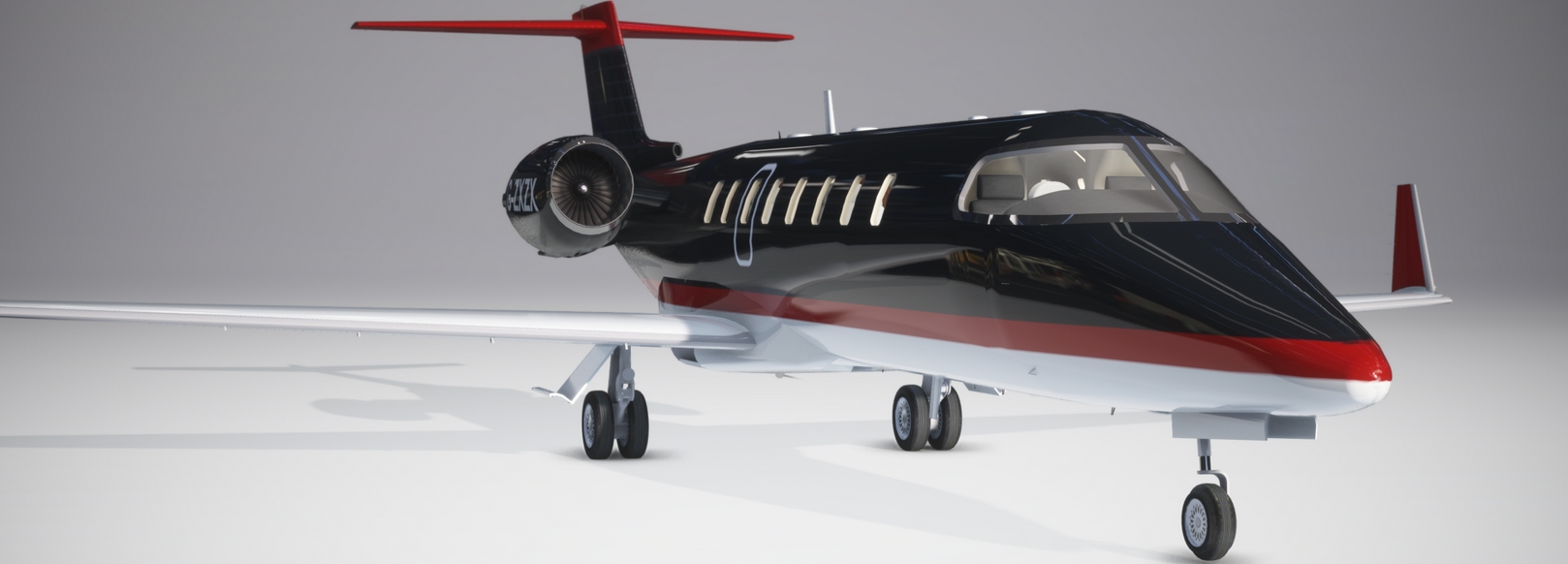
For that i have not changed all my airmanager code since i am waiting for the just flight lear and this simplifies my code hughely because of the popout avionics option.
But , since it does take a while for the release of this i think i will change it anyway.
I will let you know my findings..
For that i have not changed all my airmanager code since i am waiting for the just flight lear and this simplifies my code hughely because of the popout avionics option.
But , since it does take a while for the release of this i think i will change it anyway.
I will let you know my findings..
Lear45 in FS2020/24 Solutions