


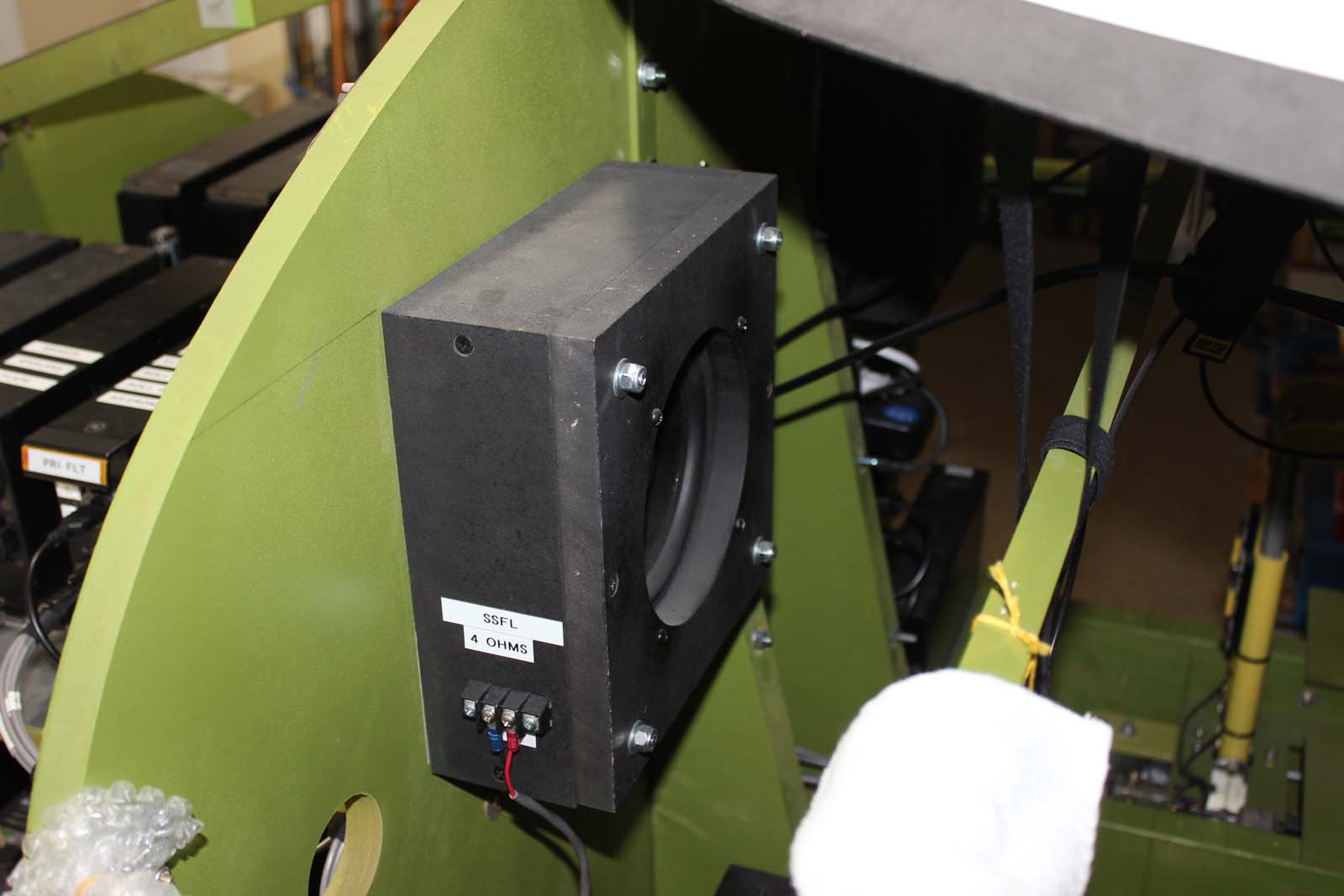
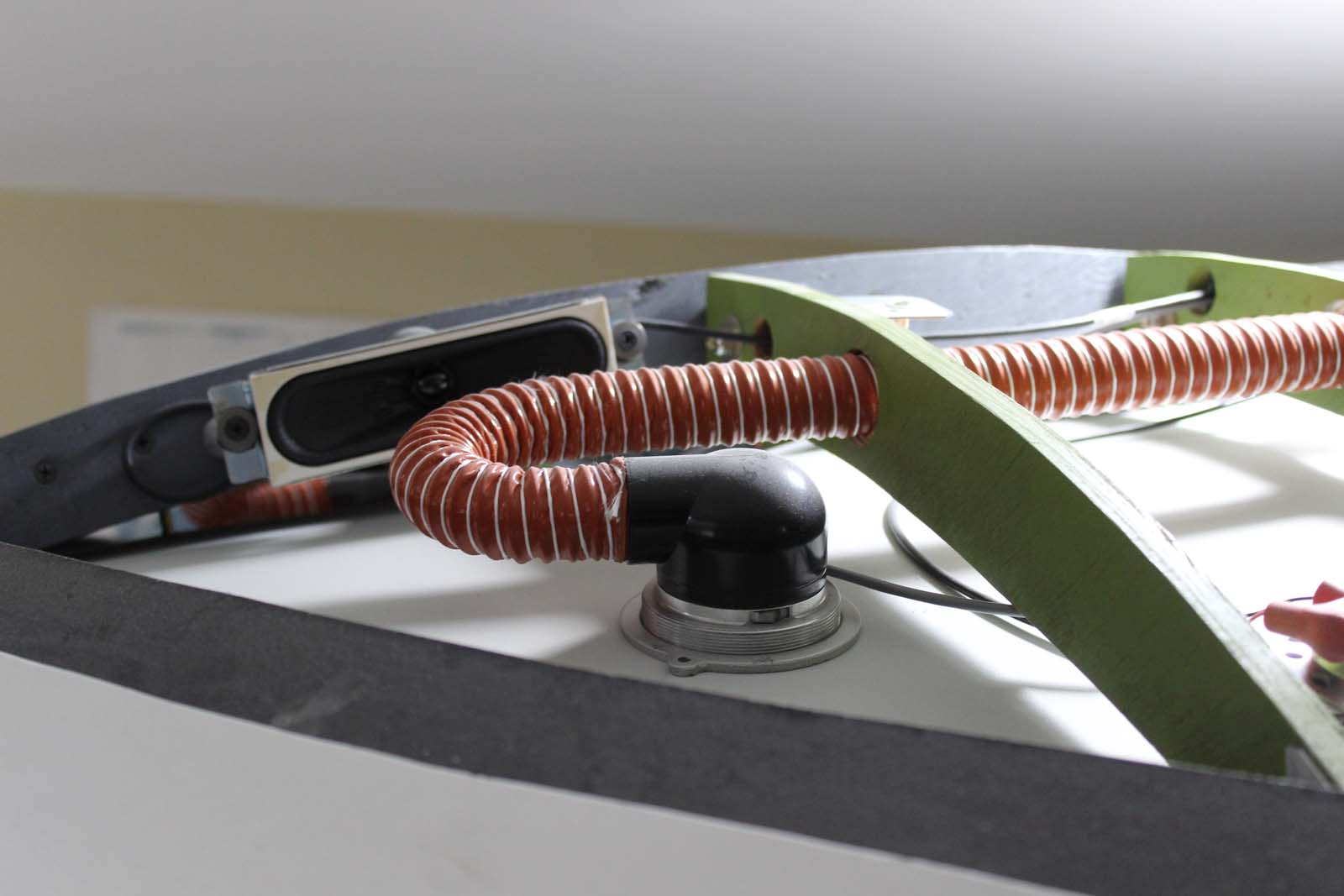
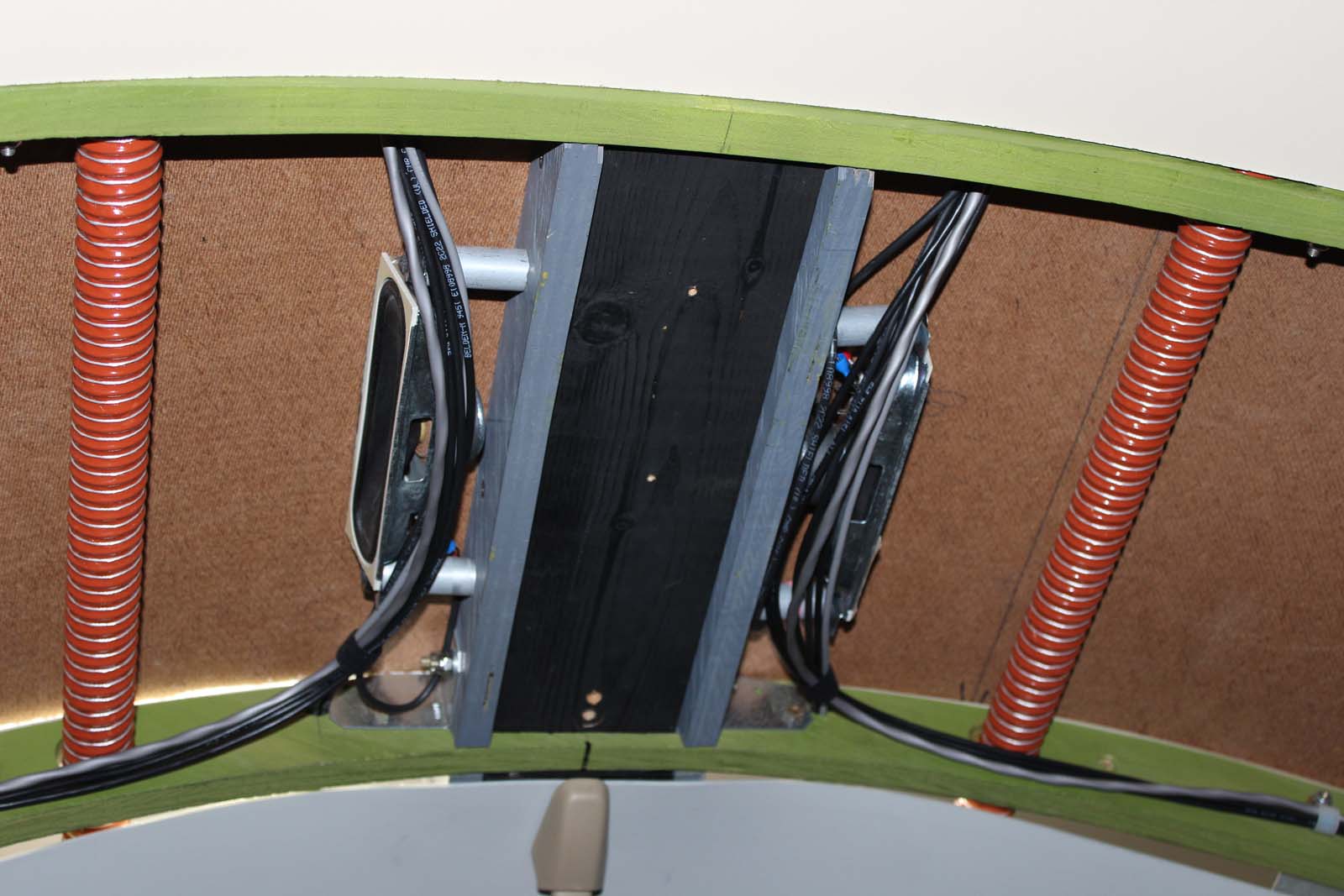
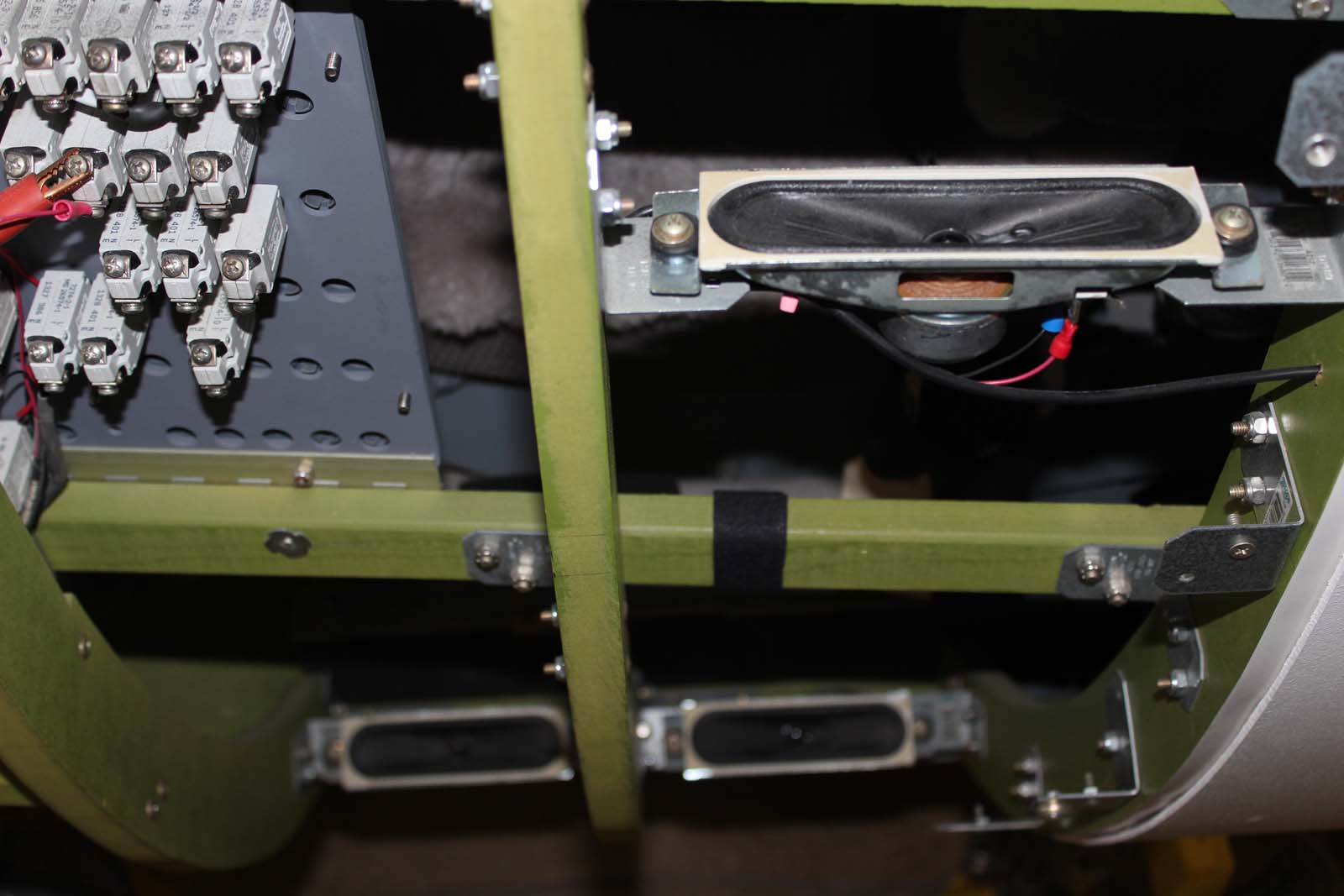
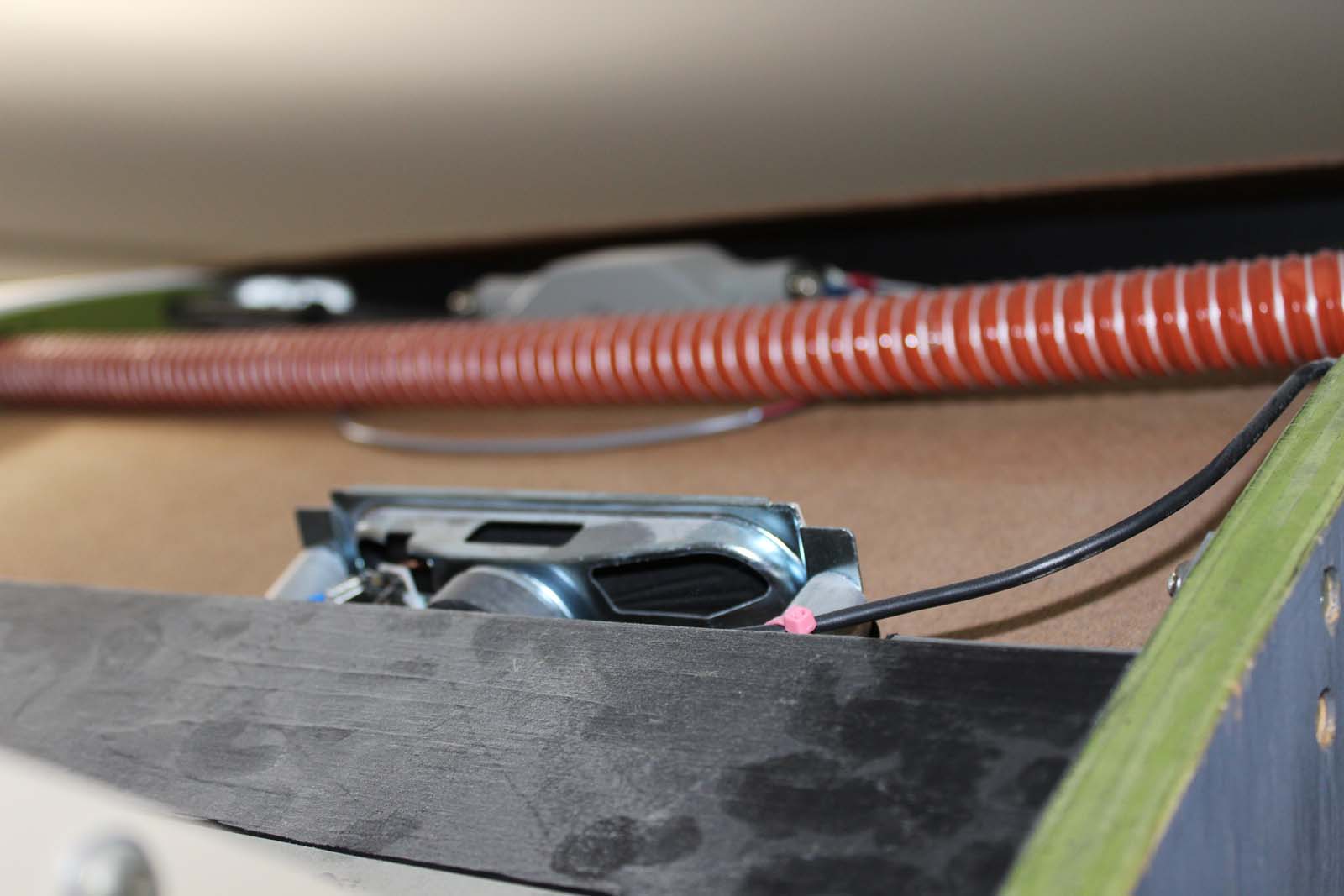
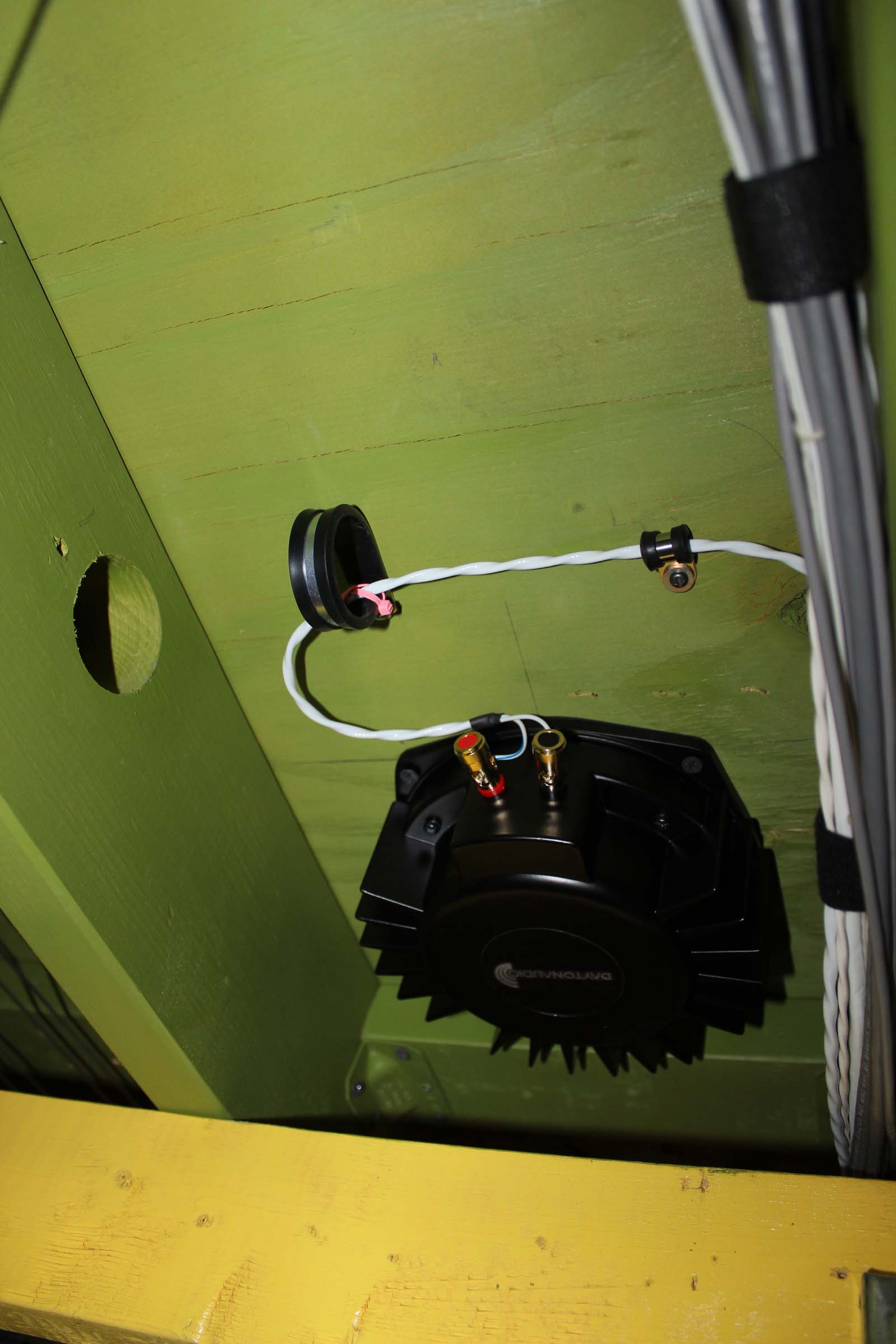
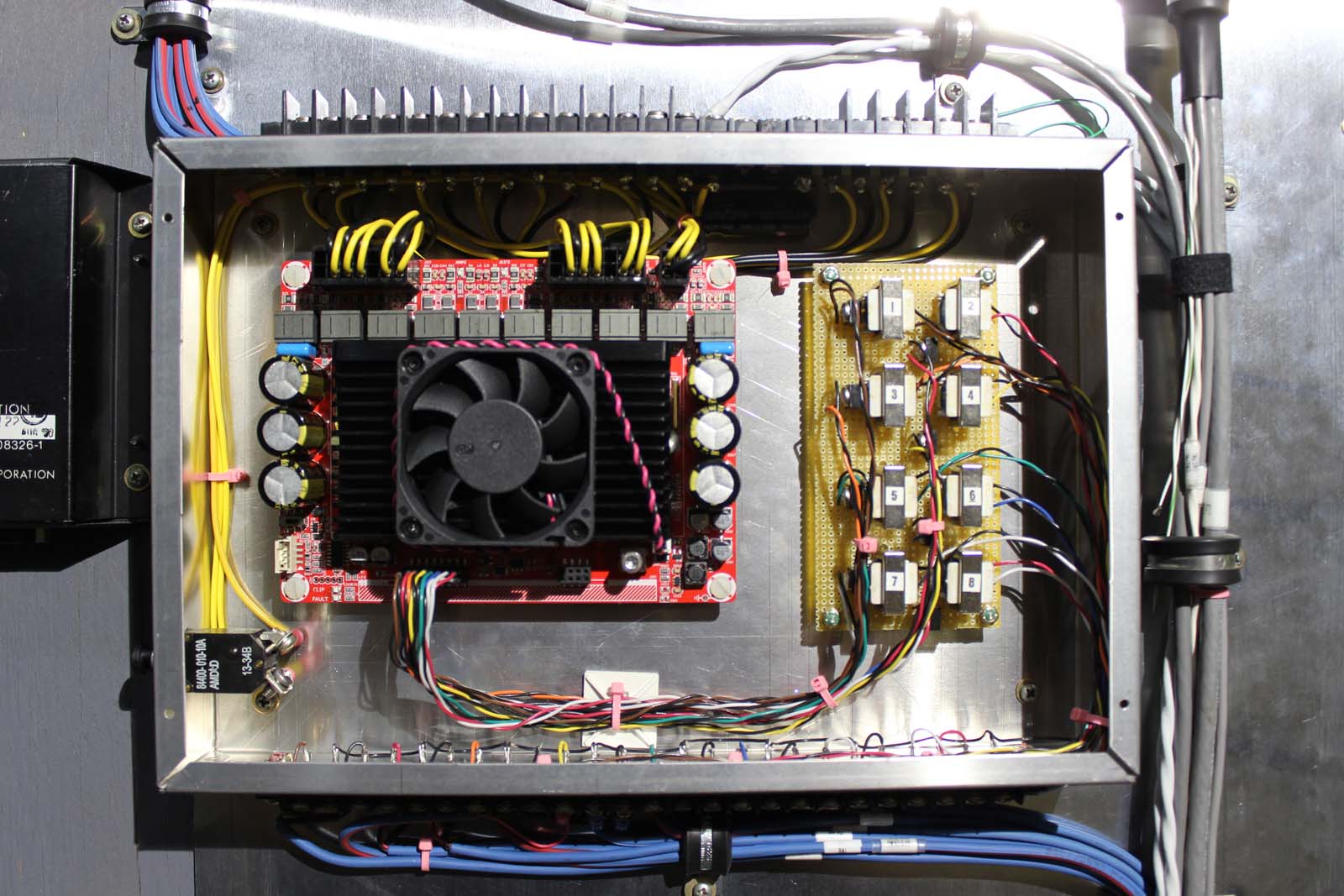
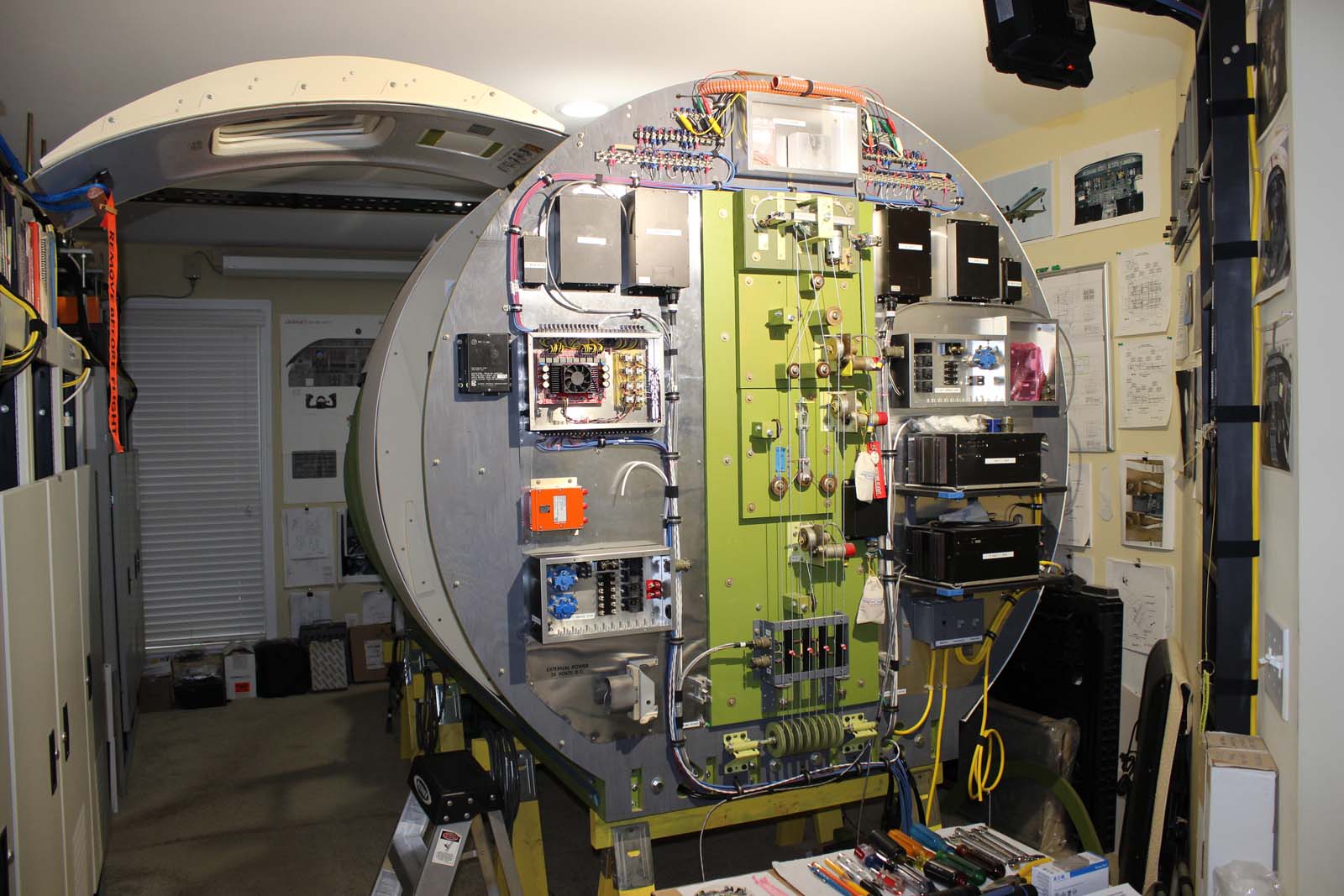
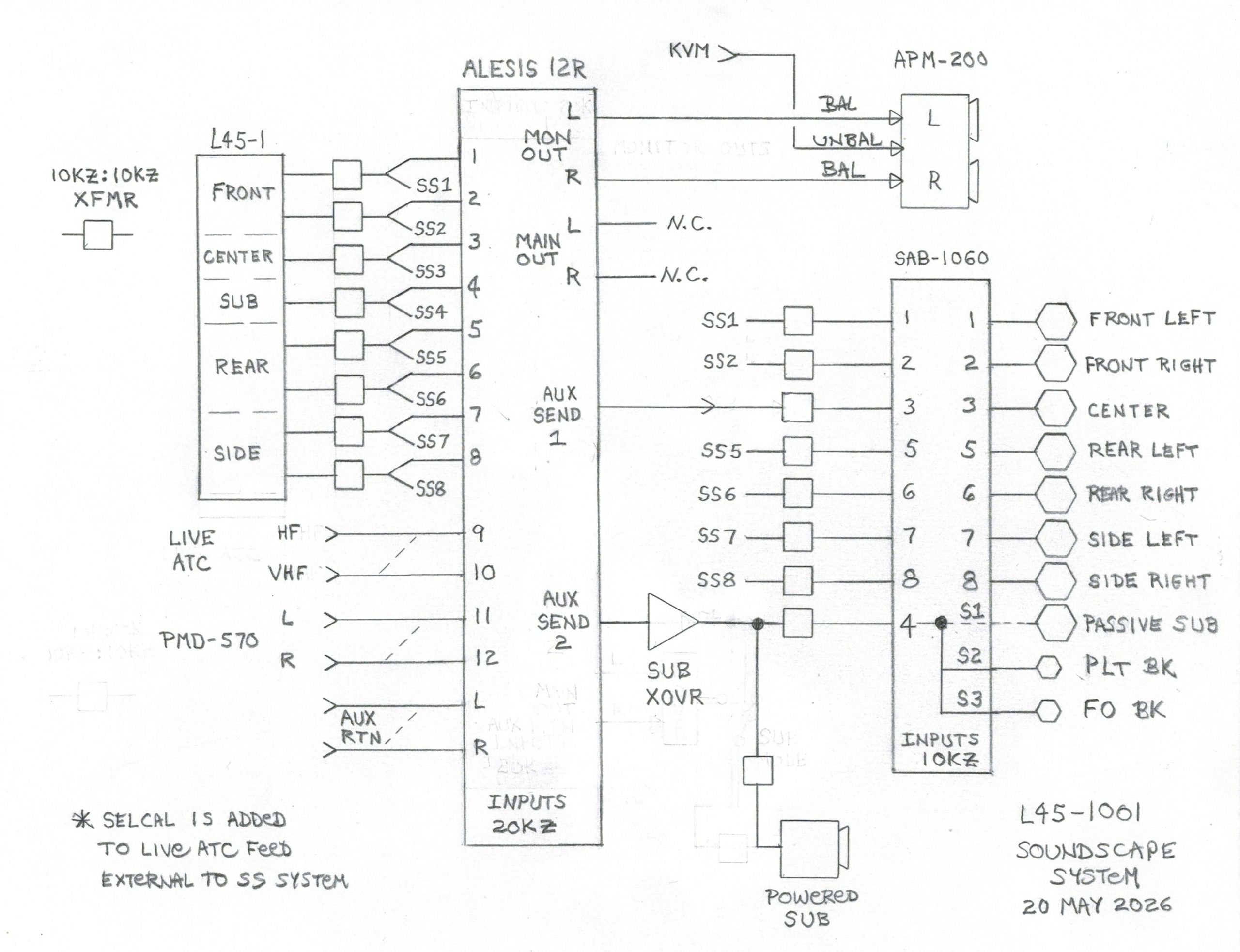
Lear 45-1001 Build History SoundScape System ATA-31, Indicating / Recording Systems Rev 3 July 2026 The L45-1001 introduction contains useful background information on this build. If somehow you have arrived at this place and have not read the L45-1001 introduction you will find it HERE The SoundScape System The soundscape system in a simulator reproduces the flight environment and airframe sounds normally heard in a real aircraft. In a simulator these sounds are created by a combination of software and hardware devices. The soundscape system doesn’t generate these sounds. It is simply the “speaker and amplifier systems” that reproduce sounds in the cockpit. Many small details contribute to the perception of flight in a simulator. The term “soundscape” originated in the motion picture industry. It refers to the intentional use of carefully designed sound themes to enhance the movie viewing experience. In much the same way that landscaping is designed and used to enhance the appearance of a physical space, soundscaping is used to enhance the sounds employed in a simulator. SoundScape Systems: Basic to complex Early sound systems were monaural (mono), with a single channel of audio reproduced by a single channel of amplification and a single speaker. Regardless of the application all sounds produced by a mono system come from a single point-source location in the room. Stereo sound systems consist of two channels of audio, each one reproduced by it’s own channel of amplification and a speaker. If the speakers are placed apart, horizontally, a stereo system can reproduce the effect of “position” in the sound field. The apparent position of the sound source can be “moved” within the sound field by a method known as “panning”. Panning changes the relative amplitude of the sound in the two stereo channels. For example, if you “pan left”, the left side speaker will be louder than the right side speaker and the location of the sound source will be perceived as left of center. Most simulator and game software defaults to the stereo mode of operation. This might be because many gamers prefer headphones, or because the game software developer did not see a need for anything better. Your guess is as good as anyone’s. The point is, most simulator and add-in sounds are going to default to simple stereo. Some builders may find that adequate, others do not. Back in the 1900s ( 😉 ) some clever people developed something called “surround sound”. This type of sound system has the ability to place sound sources in virtually any location “around” the listener to produce an immersive experience. Today the two most popular standardized versions of this are commonly known as 5.1 and 7.1 surround sound. These are true surround sound systems. Speakers are located in front, center, sides, and rear of the listener and are usually augmented by a subwoofer. Surround sound systems make use of the concept of spatial position to locate sound sources within the sound field, called the sound landscape. A sound source can be “placed” nearly anywhere with respect to the listener by careful manipulation of the various channel signals. These include amplitude, phase, timing, and spectral domain. For example, in a Learjet 45 flight simulator, we might want the engine sounds to appear to come from “behind” the cockpit, as they would be heard in the real aircraft. Other sounds can be similarly assigned to a spatial location in the soundscape. Surround sound systems consist of multiple channels of amplification and speakers in very specific locations relative to the listener. A 5.1 system has six channels of amplification (5 surround speakers + a subwoofer). A 7.1 system has eight channels of amplification (7 surround speakers + a subwoofer). More advanced surround systems, such as Dolby Atmos, can contain literally dozens of channels and speakers and are capable of reproducing sounds anywhere within a 360 degree sphere around the listener. The most complex Dolby Atmos standard configuration is a 24.1.10 system. More information on surround sound systems can be found at: https://en.wikipedia.org/wiki/Dolby_Atmos So we have choices, all the way from simple mono systems out to multi-channel Dolby Atmos. Which one(s) are practical for use in our Learjet simulators? “Surrounded by sound” is not the same thing as “Surround Sound”, and this works to our advantage! There are issues to be solved in order to use surround sound in our sim cockpits: And here: https://www.simhubdash.com/supported-games/ Certain aspects of cockpit sound can be implemented in hardware, relieving the need for a software solution. Think about the last time you flew in a real aircraft. Where did the “sound” come from? Some sounds, such as the sound of air moving against the skin of the aircraft, appears to come from “all around” the observer. Also consider what you “heard” through the soles of your shoes, or your seat. Some sounds heard in a real aircraft arrive as airframe vibration that we feel more than we hear. This offers opportunities for improving the cockpit soundscape even when Microsoft is not cooperative. Haptic devices communicate information to humans by applying force, vibration, or motion to the user. One example of these devices are Buttkickers. Buttkickers (a brand name) apply vibration to the seat or airframe to emulate things like gear contact, engine vibration, or various airframe noises associated with flaps, spoilers, etc. Practical simulator sound solutions usually combine stereo or surround sources with a subwoofer and one or more haptic devices. Builders can choose a simple stereo or more complex surround design to suit the needs of their cockpit. The L45-1001 SoundScape System A reminder: This design is a developmental effort and is subject to change. For L45-1001 I decided to install a full-up 7.1.2 surround system. Why 7.1.2 if our simulator software only produces basic stereo sound? Because, eventually, surround sound support will be implemented by someone or I can make it play via hardware in the signal chain. But no software or hardware can produce an immersive surround experience unless the necessary speaker array is present and installed in the proper locations in the airframe. For L45-1001 most of the surround speakers are installed in the spaces between the outer skin and the interior closeout panels. I installed the speakers and wiring now, before further assembly work closes up those spaces and makes that work difficult. This makes the airframe surround capable and the software issues will have to catch up as they can. Speaker array A conventional speaker layout for 7.1 surround sound requires speakers in each of the following locations. Front left, front right, front center, left surround, right surround, left rear surround, right rear surround, and sub-woofer. The Front Left (and Front Right) speakers are mounted on the aft side of the pressure bulkhead at FS 149.50”. This is the bulkhead between the MIP and the nose avionics bay. These are 8” speakers in a wooden box. Nothing fancy required. I built the wooden boxes to fit in the space available with little regard for the acoustics of the baffle. The Center channel speakers are mounted above the ceiling panels down the center line of the airframe. In a traditional surround layout the center speaker would be located between the front left and front right speakers. But our Learjet 45s are narrow toward the nose. There is only about two feet of horizontal separation between the front left and front right speakers. Placing the center speaker between them would not result in a useful widening of the sound field because they simply are too close together. By placing the center channel speakers in the overhead, along the center line of the airframe, that channel becomes useful for ambient sounds not provided by software. During testing I sent the sound of the slipstream to this center channel. Slipstream sound is largely band-limited white noise. When played through these center speakers the effect is that “it seems to come from all around you” as you are seated in the cockpit. This center channel is also used for Instructor Talkback. This allows the sim operator at the Instructor Station to speak directly to the crew in the cockpit even when the airframe avionics (the AV-850As) are not in operation. The speaker seen in this photo is mounted near the overhead WEMAC air vent above the pilot. Another center speaker is mounted on the right side in the same location and manner. These center channel speakers are mounted in the ceiling just aft of the seat backs. The ceiling closeout panel in this location was not installed when this photo was taken. The Left Surround and Right Surround speakers are mounted in the wall interior space just aft of the breaker panels on each side. There are three on each side, two near the floor line and one near the breaker panel. This is the Left Rear Surround speaker. It is mounted against the entry door header above the ceiling. The Right Rear Surround speaker is mounted against a header on the right side of the airframe in a similar manner. A separate speaker is mounted above the ceiling on the right side for the APU. Small acoustic ports (openings) along the aft end of the ceiling closeout panels direct the sound from these speakers into the entry area of the cockpit/cabin. Similar acoustic ports are provided for these rear speakers in the outer skin because the rear speakers are the primary source of the engine / APU sounds. The exterior ports allow you to hear the engines / APU from the outside as you walk up to the aft end of the simulator. Subwoofer channel speaker The present design for L45-1001 uses a powered subwoofer. (The SAB-1060 amplifier can directly drive a non-powered subwoofer if desired.) The subwoofer is located on the floor below the forward avionics bay. Human hearing at low frequencies is insensitive to spatial location so the subwoofer can essentially be placed in nearly any workable location on the airframe. I originally intended to place the subwoofer on the center line of the floor just behind the forward pressure bulkhead (more or less between the Front Left and Front Right speakers). The subwoofer I have on hand will fit in that space but when it is in place it blocks maintenance access to wiring and some of the flight control system components. Eventually, after everything is working, I may install the subwoofer in the airframe permanently but for the moment it’s sitting on the floor under the airframe. It’s a Sony model SA-WMS230. Haptic devices L45-1001 is equipped with two low-frequency transducers attached directly to the airframe floor. A transducer is located below each of the seats. These are driven in-phase from separate amplifier outputs. The purpose of these transducers is to introduce vibration and other airframe sounds into the airframe itself. Both transducers are driven from the same signal as the subwoofer. Thus there are three different sources of low-frequency sounds and vibration components in the airframe. The combined effect is very realistic. You hear these sounds with your ears and you feel them through the airframe, your feet, and your seat. I have no experience with attaching haptic devices directly to a seat. Many builders do that and it reportedly works well. I’ve attached these directly to the airframe in L45-1001 because certain sounds should appear to come from the airframe. This makes a difference in an enclosed cockpit. The entire airframe becomes a secondary sound source, all around you, in an enclosed cockpit with haptic devices. When I first installed the soundscape system in L45-1001 it only had a single haptic device. I installed it on the airframe under the pilot seat and did some testing. That device did a remarkable job of inducing vibration in the airframe. But when I moved over to the co-pilot seat and repeated the testing I had the impression that the vibration felt like it was coming from “over there somewhere”. So I ordered another identical transducer and installed it on the airframe under the co-pilot seat. The difference in amplitude of the sounds and vibration with two transducers vs. one was not significant, at least as far as I could tell. But the spatial direction to the source was immediately improved. With both transducers running I cannot tell any difference in those effects when sitting in the pilot seat or the co-pilot seat. In other words, I perceive the same experience when sitting in either seat. It’s just my subjective opinion but I think it’s worth the extra cost of two transducers vs. one. I’m using these transducers: https://www.daytonaudio.com/product/1953/bst-300ex-extreme-high-power-pro-tactile-bass-shaker-300-watts The amplifier module The amplifier system is built around a Dayton Audio SAB-1060 module. This module is specifically designed for surround sound gaming applications. It provides ten audio channels, each rated at 60 watts output. Eight channels have separate inputs and speaker outputs. The sub channel has a single input which drives three separate speaker outputs. The SAB-1060 requires 24 vdc at about 10 amps for operation. The circuit board on the right hand side provides a mounting space for the line matching transformers and individual channel attenuators (trim pots). The signal sources go to a terminal strip at the bottom and the speaker outputs are on a terminal strip along the top. The SAB-1060 is supplied with pcb connectors that make it easy to remove the SAB-1060 module from this chassis box without having to disconnect any of the airframe wiring on the terminal strips. “What do those transformers do?” Three specific things: (1) They provide a balanced system design throughout the signal chain from the pc sound outputs all the way to each individual amplifier channel. This makes it easy to add additional signal processing in the chain between the computer(s) and the soundscape speakers. (2) They provide impedance matching between the computer sound outputs and other components in the signal chain. (3) They help to eliminate electrical interference from the various power supplies and other electromechanical components in the airframe. “Are the transformers mandatory parts of the design?” It depends on your particular build. The length of the signal path between the computers and the soundscape amplifier in the airframe on L45-1001 is about 52 feet so a balanced transmission line is required to avoid electrical interference. If the length of your audio signal path between the computers and amplifier inputs is say......ten or twenty feet....you likely do not need them for interference rejection. It also depends on whether or not you wish to add signal processing to your soundscape system. Notice on the block diagram that matching transformers are provided at both ends of the interconnecting wiring. The audio outputs from computers are UN-balanced circuits, but nearly all modern signal processing devices require balanced connections. So these unbalanced pc connections must be converted to balanced somewhere and that’s what the transformers on the originating end of the circuits are doing. The SAB-1060 amplifier module can accept UN-balanced circuits directly, but if you have other signal processing devices in the chain they will be sending balanced signals toward the SAB-1060 and those will also have to be converted. The basic idea is simple: Convert all audio sources (AT THE SOURCE) and all audio destinations (AT THE AMPLIFIER) to balanced circuits. This allows everything else in the “middle” of the signal chain to operate seamlessly without further impedance transformation or circuit conversions. And then there’s this....... Note that the SAB-1060 is supplied with two different input adapters. You install the one you need depending on your system design. L45-1001 is using the analog input adapter because that permits the insertion of additional signal sources and processing at the hardware level. The SAB-1060 can also accept surround sound directly via a USB connection straight from the computer. But this isn’t simple if you want to add additional signal sources or processing via USB because all of that must be done in software on the source computer(s). This is complicated by the earlier discussion of stereo vs. surround systems. Stereo, the default for most sim software, has no subwoofer channel. Surround sound provides a separate sub signal, but stereo sim sound doesn’t. So where are you going to get a sub signal to drive the subwoofer speaker and any haptic devices from a stereo source? A sub signal can be derived from a stereo source using various methods. This will provide a subwoofer channel source for those parts of the soundscape system even when the sim software does not. L45-1001 is using the most common method for this, an external active crossover. It’s a DBX model 223. This unit accepts a stereo source, filters out the “sub” signal components, and sums them into a single sub output. The 223 sub output becomes the source for the subwoofer and haptic devices, even when the sim software does not natively provide it. (I’m actually running the 223 in the “mono” mode for L45-1001 because I’m doing the summing in an analog mixer. The 223 can run in either mode, as you require. See the block diagram later in this post.) This is the aft bulkhead. Many flight control, electrical, and engine / APU systems are located here. The soundscape amplifier box is here. At the top of this bulkhead, in the center, is the environmental air mixing box (not yet completed). It supplies ventilation air to the cockpit vents. To the left and right of the air mixing box are a series of terminal strips. All of the soundscape speakers are individually wired to those terminal strips. This makes it possible to experiment with different speaker/channel assignments even after the airframe skin and interior panels are in place. The acoustic performance of the various speakers will change once the remaining skin and interior panels are in place. I don’t expect to require much tinkering with the channel configurations, but the speaker wiring had to go somewhere so I put it all back here in one location for easy access. System block diagram A quick essential requirements review is useful before going further. The question is, “What do we want the soundscape system to do?” Below is the block diagram for the L45-1001 soundscape system. This design makes use of a small multiple bus analog mixer (an Alesis Studio 12R) for signal processing and channel assignment in the development environment. This permits sending certain audio signals to specific soundscape channels without any software modification. This mixer is not required if you have no need for channel assignment or signal processing beyond what comes straight out of the computer sound outputs. But if you don’t want to hear your engine sounds coming from the front of the airplane you’re going to need some means of assigning them elsewhere. The mixer makes it easier to figure those things out during development. Eventually the mixer may be eliminated and replaced with a summing matrix. The external sub crossover unit can likely be replaced with some passive low-pass filter networks. But for the moment this soundscape design is a developmental effort. Those extra components make it very easy to tinker with surround channel balancing, changing the spatial assignments, or other things that improve the cockpit sound experience. Once we know more or less exactly what works this design can be simplified. Performance Evaluation How is it possible to evaluate a surround system’s performance without a source of surround sound content? It’s not, of course, but there are alternatives. The basic issue is that sim software defaults to run in two-channel stereo mode with no sub channel. The Society of Motion Picture and Television Engineers (SMPTE) is an organization that establishes and maintains technical standards, many of which are also recognized ITU (international) standards. SMPTE provides standardized testing tools and content samples for verifying the performance of systems. I used SMPTE surround sound sample content to evaluate the soundscape system in L45-1001. I used test loops for stereo, 5.1, and 7.1 systems for this testing. The sound quality is very good, and the spatial rendering of sound sources is excellent. When I tested using 7.1 source material the performance was good enough to make me - literally - "duck" when a helicopter flew right overhead my Learjet. It's that good. It really is! I have also tested the system using ordinary stereo music recordings to evaluate how well the analog mixing and sub crossover configuration derives a subwoofer signal from a source that does not provide one natively. Almost no music is released in surround sound formats so it's interesting to evaluate how this system performs with stereo music tracks. The sound quality and sub channel performance is very good. There is, of course, no spatial rendering beyond the two channel stereo sound field with a stereo source. But if you want to play music in your cockpit this system makes a very fine stereo! I also tested the system with P3D v6, flying the Commander 114 as the test aircraft in the default stereo sound mode. Stereo + sub + haptic performance is pretty amazing all by itself with no surround source material. Subjectively, this is likely because a single-engine piston aircraft produces a lot of low frequency sound and rumble, certainly more than a Learjet, and low frequency sounds work well via the sub + haptic channels. Is the stereo + sub + haptic configuration good enough for an enclosed cockpit simulator? I think it is, certainly for piston and other aircraft types that produce a lot of low frequency sounds and have the engine(s) in the front. Is stereo + sub + haptics good enough for a Learjet 45 simulator? Well, there’s no surround content in that configuration and a modern turbine aircraft doesn’t make a lot of low frequency noise so I don’t know. I can guess, but my opinion is no better than yours without actual testing. I don’t have the Learjet 45 installed in P3D and have not done any audio testing of turbine aircraft types. That’s the next step in this experiment. I’ll install the Learjet 45, do some testing, and update this posting when I have those results. HOME: This link goes to the L45-1001 build history introduction. Links to other L45-1001 posts are found at the END of the introduction. Lear 45-1001 Build History SoundScape System ATA-31, Indicating / Recording Systems Rev 3 July 2026 The L45-1001 introduction contains useful background information on this build. If somehow you have arrived at this place and have not read the L45-1001 introduction you will find it HERE The SoundScape System The soundscape system in a simulator reproduces the flight environment and airframe sounds normally heard in a real aircraft. In a simulator these sounds are created by a combination of software and hardware devices. The soundscape system doesn’t generate these sounds. It is simply the “speaker and amplifier systems” that reproduce sounds in the cockpit. Many small details contribute to the perception of flight in a simulator. The term “soundscape” originated in the motion picture industry. It refers to the intentional use of carefully designed sound themes to enhance the movie viewing experience. In much the same way that landscaping is designed and used to enhance the appearance of a physical space, soundscaping is used to enhance the sounds employed in a simulator. SoundScape Systems: Basic to complex Early sound systems were monaural (mono), with a single channel of audio reproduced by a single channel of amplification and a single speaker. Regardless of the application all sounds produced by a mono system come from a single point-source location in the room. Stereo sound systems consist of two channels of audio, each one reproduced by it’s own channel of amplification and a speaker. If the speakers are placed apart, horizontally, a stereo system can reproduce the effect of “position” in the sound field. The apparent position of the sound source can be “moved” within the sound field by a method known as “panning”. Panning changes the relative amplitude of the sound in the two stereo channels. For example, if you “pan left”, the left side speaker will be louder than the right side speaker and the location of the sound source will be perceived as left of center. Most simulator and game software defaults to the stereo mode of operation. This might be because many gamers prefer headphones, or because the game software developer did not see a need for anything better. Your guess is as good as anyone’s. The point is, most simulator and add-in sounds are going to default to simple stereo. Some builders may find that adequate, others do not. Back in the 1900s ( 😉 ) some clever people developed something called “surround sound”. This type of sound system has the ability to place sound sources in virtually any location “around” the listener to produce an immersive experience. Today the two most popular standardized versions of this are commonly known as 5.1 and 7.1 surround sound. These are true surround sound systems. Speakers are located in front, center, sides, and rear of the listener and are usually augmented by a subwoofer. Surround sound systems make use of the concept of spatial position to locate sound sources within the sound field, called the sound landscape. A sound source can be “placed” nearly anywhere with respect to the listener by careful manipulation of the various channel signals. These include amplitude, phase, timing, and spectral domain. For example, in a Learjet 45 flight simulator, we might want the engine sounds to appear to come from “behind” the cockpit, as they would be heard in the real aircraft. Other sounds can be similarly assigned to a spatial location in the soundscape. Surround sound systems consist of multiple channels of amplification and speakers in very specific locations relative to the listener. A 5.1 system has six channels of amplification (5 surround speakers + a subwoofer). A 7.1 system has eight channels of amplification (7 surround speakers + a subwoofer). More advanced surround systems, such as Dolby Atmos, can contain literally dozens of channels and speakers and are capable of reproducing sounds anywhere within a 360 degree sphere around the listener. The most complex Dolby Atmos standard configuration is a 24.1.10 system. More information on surround sound systems can be found at: https://en.wikipedia.org/wiki/Dolby_Atmos So we have choices, all the way from simple mono systems out to multi-channel Dolby Atmos. Which one(s) are practical for use in our Learjet simulators? “Surrounded by sound” is not the same thing as “Surround Sound”, and this works to our advantage! There are issues to be solved in order to use surround sound in our sim cockpits: And here: https://www.simhubdash.com/supported-games/ Certain aspects of cockpit sound can be implemented in hardware, relieving the need for a software solution. Think about the last time you flew in a real aircraft. Where did the “sound” come from? Some sounds, such as the sound of air moving against the skin of the aircraft, appears to come from “all around” the observer. Also consider what you “heard” through the soles of your shoes, or your seat. Some sounds heard in a real aircraft arrive as airframe vibration that we feel more than we hear. This offers opportunities for improving the cockpit soundscape even when Microsoft is not cooperative. Haptic devices communicate information to humans by applying force, vibration, or motion to the user. One example of these devices are Buttkickers. Buttkickers (a brand name) apply vibration to the seat or airframe to emulate things like gear contact, engine vibration, or various airframe noises associated with flaps, spoilers, etc. Practical simulator sound solutions usually combine stereo or surround sources with a subwoofer and one or more haptic devices. Builders can choose a simple stereo or more complex surround design to suit the needs of their cockpit. The L45-1001 SoundScape System A reminder: This design is a developmental effort and is subject to change. For L45-1001 I decided to install a full-up 7.1.2 surround system. Why 7.1.2 if our simulator software only produces basic stereo sound? Because, eventually, surround sound support will be implemented by someone or I can make it play via hardware in the signal chain. But no software or hardware can produce an immersive surround experience unless the necessary speaker array is present and installed in the proper locations in the airframe. For L45-1001 most of the surround speakers are installed in the spaces between the outer skin and the interior closeout panels. I installed the speakers and wiring now, before further assembly work closes up those spaces and makes that work difficult. This makes the airframe surround capable and the software issues will have to catch up as they can. Speaker array A conventional speaker layout for 7.1 surround sound requires speakers in each of the following locations. Front left, front right, front center, left surround, right surround, left rear surround, right rear surround, and sub-woofer. The Front Left (and Front Right) speakers are mounted on the aft side of the pressure bulkhead at FS 149.50”. This is the bulkhead between the MIP and the nose avionics bay. These are 8” speakers in a wooden box. Nothing fancy required. I built the wooden boxes to fit in the space available with little regard for the acoustics of the baffle. The Center channel speakers are mounted above the ceiling panels down the center line of the airframe. In a traditional surround layout the center speaker would be located between the front left and front right speakers. But our Learjet 45s are narrow toward the nose. There is only about two feet of horizontal separation between the front left and front right speakers. Placing the center speaker between them would not result in a useful widening of the sound field because they simply are too close together. By placing the center channel speakers in the overhead, along the center line of the airframe, that channel becomes useful for ambient sounds not provided by software. During testing I sent the sound of the slipstream to this center channel. Slipstream sound is largely band-limited white noise. When played through these center speakers the effect is that “it seems to come from all around you” as you are seated in the cockpit. This center channel is also used for Instructor Talkback. This allows the sim operator at the Instructor Station to speak directly to the crew in the cockpit even when the airframe avionics (the AV-850As) are not in operation. The speaker seen in this photo is mounted near the overhead WEMAC air vent above the pilot. Another center speaker is mounted on the right side in the same location and manner. These center channel speakers are mounted in the ceiling just aft of the seat backs. The ceiling closeout panel in this location was not installed when this photo was taken. The Left Surround and Right Surround speakers are mounted in the wall interior space just aft of the breaker panels on each side. There are three on each side, two near the floor line and one near the breaker panel. This is the Left Rear Surround speaker. It is mounted against the entry door header above the ceiling. The Right Rear Surround speaker is mounted against a header on the right side of the airframe in a similar manner. A separate speaker is mounted above the ceiling on the right side for the APU. Small acoustic ports (openings) along the aft end of the ceiling closeout panels direct the sound from these speakers into the entry area of the cockpit/cabin. Similar acoustic ports are provided for these rear speakers in the outer skin because the rear speakers are the primary source of the engine / APU sounds. The exterior ports allow you to hear the engines / APU from the outside as you walk up to the aft end of the simulator. Subwoofer channel speaker The present design for L45-1001 uses a powered subwoofer. (The SAB-1060 amplifier can directly drive a non-powered subwoofer if desired.) The subwoofer is located on the floor below the forward avionics bay. Human hearing at low frequencies is insensitive to spatial location so the subwoofer can essentially be placed in nearly any workable location on the airframe. I originally intended to place the subwoofer on the center line of the floor just behind the forward pressure bulkhead (more or less between the Front Left and Front Right speakers). The subwoofer I have on hand will fit in that space but when it is in place it blocks maintenance access to wiring and some of the flight control system components. Eventually, after everything is working, I may install the subwoofer in the airframe permanently but for the moment it’s sitting on the floor under the airframe. It’s a Sony model SA-WMS230. Haptic devices L45-1001 is equipped with two low-frequency transducers attached directly to the airframe floor. A transducer is located below each of the seats. These are driven in-phase from separate amplifier outputs. The purpose of these transducers is to introduce vibration and other airframe sounds into the airframe itself. Both transducers are driven from the same signal as the subwoofer. Thus there are three different sources of low-frequency sounds and vibration components in the airframe. The combined effect is very realistic. You hear these sounds with your ears and you feel them through the airframe, your feet, and your seat. I have no experience with attaching haptic devices directly to a seat. Many builders do that and it reportedly works well. I’ve attached these directly to the airframe in L45-1001 because certain sounds should appear to come from the airframe. This makes a difference in an enclosed cockpit. The entire airframe becomes a secondary sound source, all around you, in an enclosed cockpit with haptic devices. When I first installed the soundscape system in L45-1001 it only had a single haptic device. I installed it on the airframe under the pilot seat and did some testing. That device did a remarkable job of inducing vibration in the airframe. But when I moved over to the co-pilot seat and repeated the testing I had the impression that the vibration felt like it was coming from “over there somewhere”. So I ordered another identical transducer and installed it on the airframe under the co-pilot seat. The difference in amplitude of the sounds and vibration with two transducers vs. one was not significant, at least as far as I could tell. But the spatial direction to the source was immediately improved. With both transducers running I cannot tell any difference in those effects when sitting in the pilot seat or the co-pilot seat. In other words, I perceive the same experience when sitting in either seat. It’s just my subjective opinion but I think it’s worth the extra cost of two transducers vs. one. I’m using these transducers: https://www.daytonaudio.com/product/1953/bst-300ex-extreme-high-power-pro-tactile-bass-shaker-300-watts The amplifier module The amplifier system is built around a Dayton Audio SAB-1060 module. This module is specifically designed for surround sound gaming applications. It provides ten audio channels, each rated at 60 watts output. Eight channels have separate inputs and speaker outputs. The sub channel has a single input which drives three separate speaker outputs. The SAB-1060 requires 24 vdc at about 10 amps for operation. The circuit board on the right hand side provides a mounting space for the line matching transformers and individual channel attenuators (trim pots). The signal sources go to a terminal strip at the bottom and the speaker outputs are on a terminal strip along the top. The SAB-1060 is supplied with pcb connectors that make it easy to remove the SAB-1060 module from this chassis box without having to disconnect any of the airframe wiring on the terminal strips. “What do those transformers do?” Three specific things: (1) They provide a balanced system design throughout the signal chain from the pc sound outputs all the way to each individual amplifier channel. This makes it easy to add additional signal processing in the chain between the computer(s) and the soundscape speakers. (2) They provide impedance matching between the computer sound outputs and other components in the signal chain. (3) They help to eliminate electrical interference from the various power supplies and other electromechanical components in the airframe. “Are the transformers mandatory parts of the design?” It depends on your particular build. The length of the signal path between the computers and the soundscape amplifier in the airframe on L45-1001 is about 52 feet so a balanced transmission line is required to avoid electrical interference. If the length of your audio signal path between the computers and amplifier inputs is say......ten or twenty feet....you likely do not need them for interference rejection. It also depends on whether or not you wish to add signal processing to your soundscape system. Notice on the block diagram that matching transformers are provided at both ends of the interconnecting wiring. The audio outputs from computers are UN-balanced circuits, but nearly all modern signal processing devices require balanced connections. So these unbalanced pc connections must be converted to balanced somewhere and that’s what the transformers on the originating end of the circuits are doing. The SAB-1060 amplifier module can accept UN-balanced circuits directly, but if you have other signal processing devices in the chain they will be sending balanced signals toward the SAB-1060 and those will also have to be converted. The basic idea is simple: Convert all audio sources (AT THE SOURCE) and all audio destinations (AT THE AMPLIFIER) to balanced circuits. This allows everything else in the “middle” of the signal chain to operate seamlessly without further impedance transformation or circuit conversions. And then there’s this....... Note that the SAB-1060 is supplied with two different input adapters. You install the one you need depending on your system design. L45-1001 is using the analog input adapter because that permits the insertion of additional signal sources and processing at the hardware level. The SAB-1060 can also accept surround sound directly via a USB connection straight from the computer. But this isn’t simple if you want to add additional signal sources or processing via USB because all of that must be done in software on the source computer(s). This is complicated by the earlier discussion of stereo vs. surround systems. Stereo, the default for most sim software, has no subwoofer channel. Surround sound provides a separate sub signal, but stereo sim sound doesn’t. So where are you going to get a sub signal to drive the subwoofer speaker and any haptic devices from a stereo source? A sub signal can be derived from a stereo source using various methods. This will provide a subwoofer channel source for those parts of the soundscape system even when the sim software does not. L45-1001 is using the most common method for this, an external active crossover. It’s a DBX model 223. This unit accepts a stereo source, filters out the “sub” signal components, and sums them into a single sub output. The 223 sub output becomes the source for the subwoofer and haptic devices, even when the sim software does not natively provide it. (I’m actually running the 223 in the “mono” mode for L45-1001 because I’m doing the summing in an analog mixer. The 223 can run in either mode, as you require. See the block diagram later in this post.) This is the aft bulkhead. Many flight control, electrical, and engine / APU systems are located here. The soundscape amplifier box is here. At the top of this bulkhead, in the center, is the environmental air mixing box (not yet completed). It supplies ventilation air to the cockpit vents. To the left and right of the air mixing box are a series of terminal strips. All of the soundscape speakers are individually wired to those terminal strips. This makes it possible to experiment with different speaker/channel assignments even after the airframe skin and interior panels are in place. The acoustic performance of the various speakers will change once the remaining skin and interior panels are in place. I don’t expect to require much tinkering with the channel configurations, but the speaker wiring had to go somewhere so I put it all back here in one location for easy access. System block diagram A quick essential requirements review is useful before going further. The question is, “What do we want the soundscape system to do?” Below is the block diagram for the L45-1001 soundscape system. This design makes use of a small multiple bus analog mixer (an Alesis Studio 12R) for signal processing and channel assignment in the development environment. This permits sending certain audio signals to specific soundscape channels without any software modification. This mixer is not required if you have no need for channel assignment or signal processing beyond what comes straight out of the computer sound outputs. But if you don’t want to hear your engine sounds coming from the front of the airplane you’re going to need some means of assigning them elsewhere. The mixer makes it easier to figure those things out during development. Eventually the mixer may be eliminated and replaced with a summing matrix. The external sub crossover unit can likely be replaced with some passive low-pass filter networks. But for the moment this soundscape design is a developmental effort. Those extra components make it very easy to tinker with surround channel balancing, changing the spatial assignments, or other things that improve the cockpit sound experience. Once we know more or less exactly what works this design can be simplified. Performance Evaluation How is it possible to evaluate a surround system’s performance without a source of surround sound content? It’s not, of course, but there are alternatives. The basic issue is that sim software defaults to run in two-channel stereo mode with no sub channel. The Society of Motion Picture and Television Engineers (SMPTE) is an organization that establishes and maintains technical standards, many of which are also recognized ITU (international) standards. SMPTE provides standardized testing tools and content samples for verifying the performance of systems. I used SMPTE surround sound sample content to evaluate the soundscape system in L45-1001. I used test loops for stereo, 5.1, and 7.1 systems for this testing. The sound quality is very good, and the spatial rendering of sound sources is excellent. When I tested using 7.1 source material the performance was good enough to make me - literally - "duck" when a helicopter flew right overhead my Learjet. It's that good. It really is! I have also tested the system using ordinary stereo music recordings to evaluate how well the analog mixing and sub crossover configuration derives a subwoofer signal from a source that does not provide one natively. Almost no music is released in surround sound formats so it's interesting to evaluate how this system performs with stereo music tracks. The sound quality and sub channel performance is very good. There is, of course, no spatial rendering beyond the two channel stereo sound field with a stereo source. But if you want to play music in your cockpit this system makes a very fine stereo! I also tested the system with P3D v6, flying the Commander 114 as the test aircraft in the default stereo sound mode. Stereo + sub + haptic performance is pretty amazing all by itself with no surround source material. Subjectively, this is likely because a single-engine piston aircraft produces a lot of low frequency sound and rumble, certainly more than a Learjet, and low frequency sounds work well via the sub + haptic channels. Is the stereo + sub + haptic configuration good enough for an enclosed cockpit simulator? I think it is, certainly for piston and other aircraft types that produce a lot of low frequency sounds and have the engine(s) in the front. Is stereo + sub + haptics good enough for a Learjet 45 simulator? Well, there’s no surround content in that configuration and a modern turbine aircraft doesn’t make a lot of low frequency noise so I don’t know. I can guess, but my opinion is no better than yours without actual testing. I don’t have the Learjet 45 installed in P3D and have not done any audio testing of turbine aircraft types. That’s the next step in this experiment. I’ll install the Learjet 45, do some testing, and update this posting when I have those results. HOME: This link goes to the L45-1001 build history introduction. Links to other L45-1001 posts are found at the END of the introduction.ATA-31 SoundScape System

2017-10-10